
Google Forms is not HIPAA compliant on its own. On a Google Workspace account where an administrator has signed Google's Business Associate Addendum, it is covered, because Google lists Forms as covered functionality. On a free or personal Google account it is not, and no setting changes that.
Quick answer
- You are on Google Workspace with a signed BAA: Google Forms is covered by Google's HIPAA BAA. The coverage comes from Google Drive, which Forms sits inside. It applies only where an admin has accepted the BAA.
- You are on a free or personal Google account: there is no BAA to sign, so the form cannot be used for protected health information, no matter which settings you use.
- You want add-ons on the form: any add-on you install falls outside the BAA. A form that touches PHI should have nothing installed on it.
Is Google Forms actually covered by Google's BAA?
It is. Google publishes the list of what its BAA covers. Drive appears on it with its editors named: Docs, Forms, Sheets, Slides and Vids (Google Workspace).
No tool is compliant by itself. Google provides the covered service. Your form is compliant only when the four conditions below are met.
What has to be true for a Google Form to be HIPAA compliant?
| Condition | What it means | If it is missing |
|---|---|---|
| A Workspace account | Free and personal Google accounts have no BAA path | No coverage, whatever the settings |
| A signed BAA | An admin reviews and accepts it in the Admin console | Google says PHI must not be used |
| No add-ons on the form | Third-party apps sit outside Included Functionality | That data leaves the agreement |
| Controlled access | Responses and the linked Sheet shared with named people | Coverage intact, your safeguards are not |
Teams often get the first three right and miss the fourth. A signed BAA does not stop a linked Sheet from being shared with anyone who has the link.
How do you sign the BAA in Google Workspace?
You sign it in the Admin console. Only a super administrator can see the option.
This is also what people mean when they ask whether Google Workspace is HIPAA compliant. Once an administrator accepts the BAA, Google's side of the agreement covers the whole account, Forms included. Your side of it (sharing, add-ons, retention) is still yours to set up.
- Go to Account, then Account settings, then Legal and compliance in the Google Admin console.
- Open the Security and Privacy Additional Terms section.
- Click Google Workspace/Cloud Identity HIPAA Business Associate Amendment to read it.
- Click Review and Accept, then answer the three questions confirming you are a HIPAA covered entity.
- Click OK to accept (Google Workspace Admin Help).
The legacy free edition of Google Workspace cannot accept a BAA at all.
Acceptance is electronic. Google treats it as binding, the same as a paper agreement. If an auditor asks for proof, the accepted BAA shows on that same Legal and compliance screen, and Google suggests a screenshot of it as evidence.
Accepting the BAA does not switch anything on in your forms. It changes the contract you have with Google, not the settings on the form. The add-on and sharing rows in the table above still have to be checked by hand.
Why do add-ons break HIPAA coverage?
Because the BAA covers Google's own functionality, and an add-on is somebody else's software reading your responses. Google's documentation states it plainly: third-party applications including add-ons are not included in the Included Functionality covered by the BAA (Google Workspace Admin Help).
Most teams install add-ons for response limits, PDFs or notifications. None of those can sit on a form that handles PHI.
Which Google Forms settings still matter?
Coverage is an account-level question. A few form-level settings decide how much identifying data you collect in the first place. Collecting less is the simplest safeguard available.
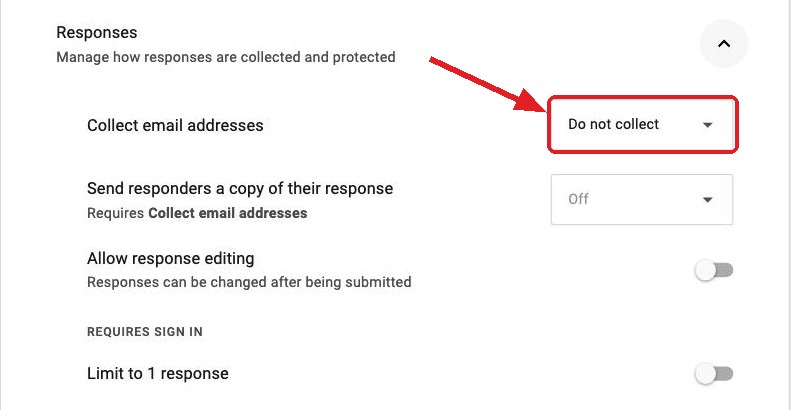
- Collect email addresses. Set it to Do not collect unless you need to know who submitted. An email address attached to a health question is itself identifying.
- Limit to 1 response. This forces a Google sign-in, which ties every submission to an account. It controls duplicates, and it also collects more identifying data.
- The linked Google Sheet. It does not inherit the form's sharing settings. Check who it is shared with, because it is usually the least restricted copy of the data.
- Response receipts. Sending a copy of the answers by email puts PHI into an inbox you do not control.
When is Google Forms the wrong tool for PHI?
When the overhead outweighs what you get. A compliant Google Form means a Workspace account with a current BAA. It also means no add-ons on the form, plus audited sharing on both the form and its Sheet.
If you are not set up for that, a purpose-built intake tool is usually less work. It signs a BAA and handles the safeguards itself, instead of you running Google Forms carefully enough to be safe.
Formester is not HIPAA-certified. We do not hold SOC 2, ISO 27001, HIPAA or BAA certifications. Do not use Formester for protected health information.
Where Formester fits
Formester fits the forms in a healthcare organization that never touch PHI. Recruitment, vendor onboarding, event registration and staff feedback are not patient data. None of them needs a BAA.
Public forms get invisible reCAPTCHA and AI spam scoring without asking anyone to sign in. Anonymous submissions with duplicate control by IP address keep a staff survey anonymous and limit it to one response per IP, with no sign-in. The free plan has unlimited forms and responses, so a non-clinical form costs nothing to run.
Forms that never touch PHI
Run recruitment, onboarding, event registration and staff surveys on the free plan, with unlimited forms and responses and no sign-in for respondents.
Try Formester freeFree forever · No credit card · 56,000+ teams
Related reading
- Make an anonymous Google Form, for collecting less identifying data in the first place.
- View responses in Google Forms, including the linked Sheet that does not inherit the form's access controls.
- CAPTCHA for Google Forms, on why an open form has no bot protection of its own.
- Send a copy of Google Form responses, the receipt setting that emails answers out of your control.
- HIPAA-compliant form builders, if Google Forms turns out to be the wrong tool.


